Solution for Technical problems of all Mobiles and Information Technology!
Solution of Technical problems of Nokia, Samsung, Sony Ericson, Q Mobile and china mobiles.This blog is designed for pakistani mobile users, who are facing different kind of problems in nokia, Q mobiles, china mobiles regarding GPRS, JAVA, Games, WIFI and software or hardware. You will also get Free Tips and Tricks for Blogger, Online Earning, PC and Softwares
When you come to work on Fiver or Upwork, you are representing your country, so take care of these things and try not to let clients hesitate to hire Pakistanis because of you.
1. If you don't know a job, don't gag it or bid on such a job.
Online Earning in Pakistan Through Digital Marketing
Online Earning in Pakistan Through Digital Marketing Course in Urdu is the best way to earn money in 2020. We provide digital marketing course for beginners 2020 Digital Marketing online Course in Urdu in to help you make money in Pakistan, This Digital Marketing Course will make you to get earning online in Pakistan through digital marketing online course in urdu 2020 This video is About FuturePay Club Product Information.
We are first Pakistani Company providing Digital Marketing Course to make people Earn Money. In this course you will learn how to earn money through digital marketing. you will learn what is digital marketing? what are the tools to do this? Social media, blogger, youtube earning, and much more. the best part of the course is it is available in lowest fee you can't imagine how is it low? We also have a unique marketing plan for you. to make money from first day you become a part of our team you have to do a simple work to get earning through easypaisa or jazzcash just recommend our course to your friends on whatsapp, facebook, and other social media platforms with your unique sponsoring link. every time a person clicks on your link and buy the course you will get paid daily, weekly, monthly if it so. A big Life time earning is waiting for you. click on the link given below and join our growing team.
Blogger can be customized and you can upload your own choice template in blogger. Adding template to blogger, however , is not similar to other types of uploads. To add custom templates in blogger website download your choice of blogger template from any free blogger templates website. A blogger template consists of .xml file. You have to copy and paste all contents of template.xml file with existing template an edit html mode. Let me explain you in steps, how to upload blogger templates.
Creating Backup o Bloger Template To create backup of blogger template click on template in dashboard. Clck on Edit HTML. Wen HTML EDITOR is opened click anywhere in html of template and select any one or two words. Press CTRL+A and select all. Now create a text file in your computer and aste all contents of your blogger template html. Rename it to the name of your blogger and save in your PC. Uploading Blogger Template Now open downloaded template's xml file and select all by pressing CTRL+A. Press CTRL+C to copy all contents of template. Noe go to your blogger template editor and select all by presing CTRL+A. Press delete. Press CTRL+V. Save template Click on view blog and see the changes. All Website shoulb be in new look according to your uploaded template.
In previous class we added meta tags in blogger template. Those tags will be same for all posts of the blog. We can add unique meta tags for all posts, It means that all posts of the blog will have its own unique meta description according to the topic of the post. To do this first of all we have to restrict our homepage description tag to homepage only. It is very simple, I will explain you how to add blogger homepage meta tags that will be displayed only i homepage. And then we will add unique meta descriptions for every post. Fortunately google provdes now built in tool to add meta descriptions. First of Click on settings on dashboard and then on Search preferences.
In search preferencesClick on description and check radio button Enable search description to yes.
Once you enable the search enable a text box will be shown. Here you enter your blogger description of homepage. Wen done click on save changes.
Now you have enter description of your blogger and it will be displayed only on homepage. To add unique description to your post click on new post or edit post for existing one. When you enter in post editor, on right side you will see an option Search Description, Click on it and a text box will be shown. Enter unique description of your post probably the first paragraph of your post containing main and supporting keywords.
So in this way you can add unique description tags to your posts for better SEO ranking. If you like my work or dislike please tell me by your comments. Thanks
What are Meta Tags To see your blogger pages links google or any other search engine results you must add meta tags to your blogger. This is a little tricky but i will try to explain in very simple way and with pictures so that you can easily follow and understand the process of adding meta tags in your blogger.
Types of Meta Tags There are three main types of meta tags
title
description
keywords
How to Create Meta Tags All meta tags have two portions one is name and other is content name is used to tell the type of meta tag and content is used to tell search engine about your page. As I told that meta tags help search engines to discriminate and evaluate web pages to what topic they belongs to. For example if we have created a page about biography of Hazrat Muhammad (Peace Be Upon Him). We create following meta tags to tell search engine about our page. <metaname="title"content="Biography of Hazrat Muhammad (Peace Be Upon Him)">
<metaname="description"content="Prophet Muhammad SAW was born in Makkah, around 570 C.E. He is the model for humanity for all walks of life to follow until the Last Hour. God sent him as a mercy for the worlds."> <metaname="keywords"content="Life of Hazrat Muhammad, Muhammad, biography of Hazrat Muhammad, history of Hazrat Muhammad">
Step 1. Go to your dashboard and click on template. Then click on Edit HTML.
Step 2. Find the string (b:include data="blog" name="all-head-content") as shown in yellow outline. Write below this string you have to add meta tags. First add title tag. <meta content="here write title of your blog" name="title" />
Step 3. Now add description meta tag. Description is explanation of your contents in 3 to 4 lines.
Step 4. Now add kewords meta tag and in ncontent section write keywords related to the topic of your blog.
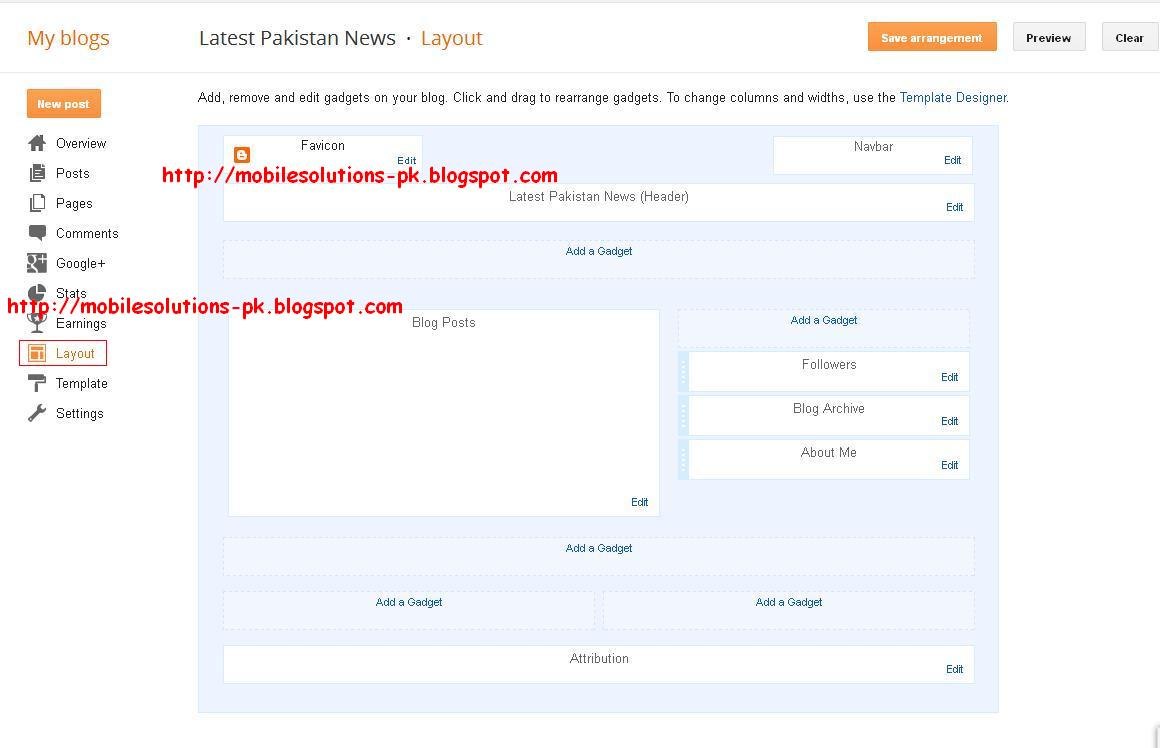
Themes provide background and color settings of the website. To display contents of the website in organized and good looking way we create a layout of the website. In previous class we have changed the theme of the blogger. In this class I will tell you how to change layout of your blog. Normally standard layout is main header on top; then main menu. below main menu page is divided in three parts navigation, contents and latest items. At the last footer comes, where copyrights information and owners links are displayed. Basic Layout is displayed in picture below.
Keeping in view the basic layout we will select blogger layout.
Step 1. Click on the layout in blogger dashboard.
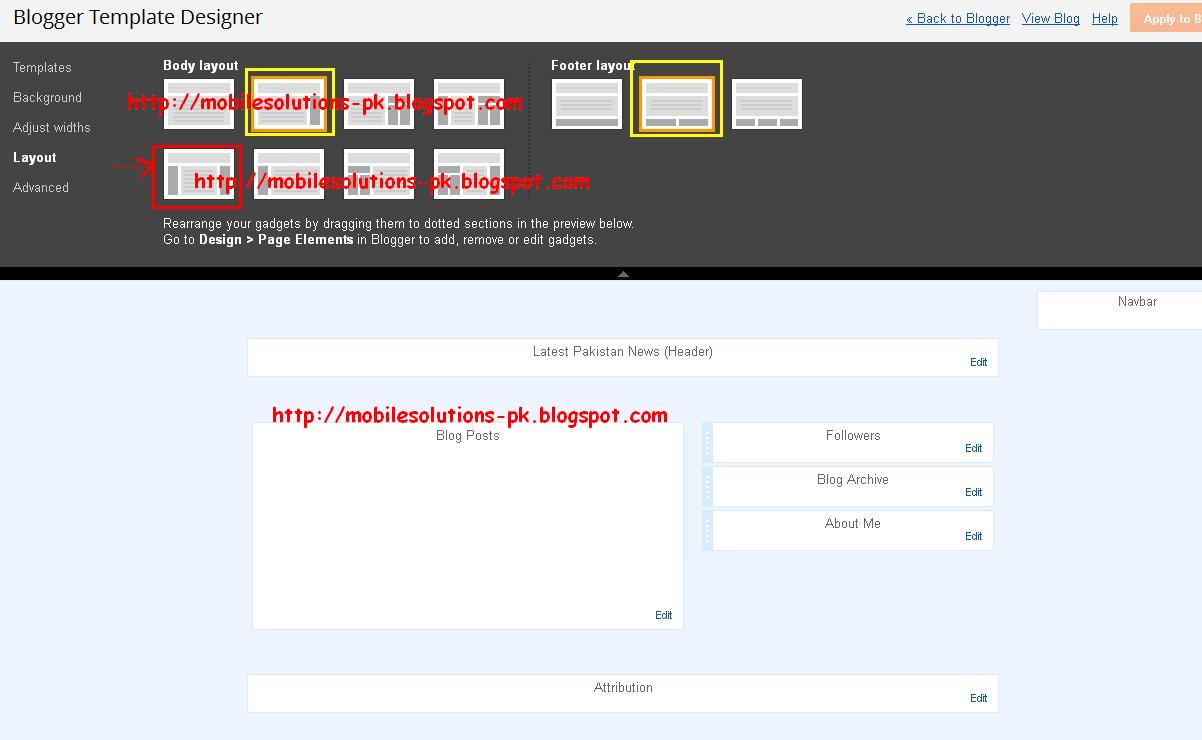
Step 1. Click on the Layout in template designer..
Step 2. Here you can select different layouts of body and footer. Select 3 column layout as shown in red box and apply.
Step 3. You will see preview right below in the page as shown below in picture. Apply to the blog. Now you have created the layout of the blog. Ask me if you have any kind of question in your mind.
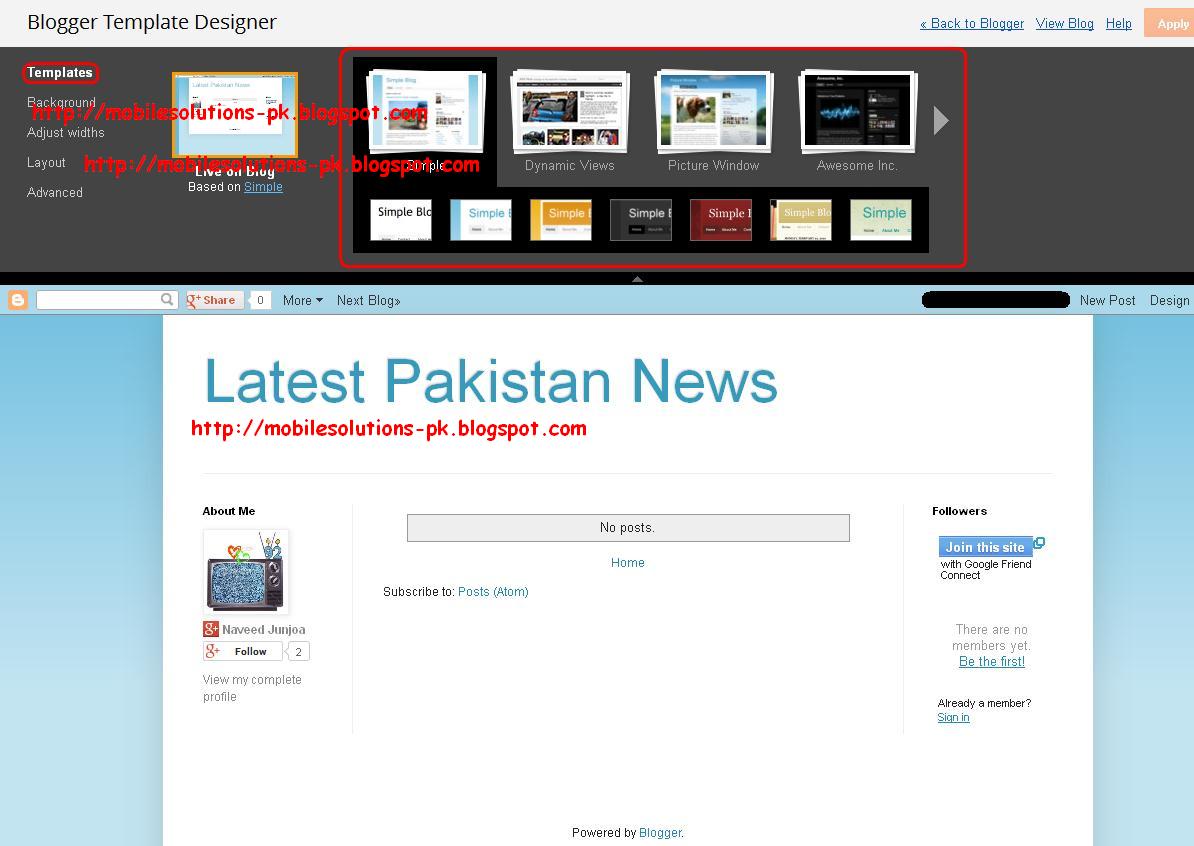
Today I will tell you how to change theme in Blogger. Themes are the basic presentation styles you want to display contents on your website. Theme should be related to your topic of the website and type and quantity of contents you want to display. In our Example we are creating News Website so we will choose theme according to it.
Step 1. Select Theme from dashboard. Select Customize right below the preview of the theme.
Step 2. Customization page have two parts. From the top you can select theme and below preview of your selected theme will be shown.
Step 3. Select Theme of your choice.
Step 4. Click on Apply to Blog when finished.
Step 5. On successful completion of theme changing blogger will display message as shown below..
In previous Post You have learned how to create a blog. Today I will show you how to create a post in Blog Step 1. To create a post click on New Post
Step 2. Enter Post title as show in picture. Enter your post contents in box for contents.
Step 3. Enter labels for your post. Labels are used to organize posts of different topics. Separate labels using commas. We will use these labels to create the structure of a drop down menu and in this way we will give a professional look to blog. Here I try to explain the Idea Suppose you are building a sports website and your main menu will contain items as shown below.
Then you will create 4 labels
matches schedule
scores
grounds history
sportsmen biography
Now if your post is related to cricket scores you will create another label cricket scores and assign these tow labels to your post. See picture for details.
Step 4. Press Done and then Publish. Next i will tell you how to manage a blog. Please Comment.
Blogger is the best choice for beginners who want to create a simple website for personal or commercial use. Website created with blogger be on top ranking right from the first day of creating it. It is the most SEO optimised CMS (Content Management System), Wordpress is No.2. Today I will Start from the First step.......... Click on Images to Enlarge Step No 1. Go to Address bar and type blogger address.
Step No 2.
Login using your Google account or signup for new one.
Step No 3.
Confirm you account information and clic on Continue to Blogger.
Step No 4.
Click on New blog as Shown.
Step No 5.
Enter your Blog Title. It will be shown on title bar of the browser and in the header of your blog.
Enter your blogs unique Address just like (http://mobilesolutions-pk.blogspot.com).
Chose Template for your Blog.
Step No 6.
Click on Start Blogging.
Step No 7.
Thats it You Have Created your Blog. Click on View Blog to view your Blog.
TureProfit is one of those HYIP sites , that has been paying for long time now. The reason they are paying for long time is their good plans. As I was reading their news, they have been online for more then 450 days, to be exact they are online for 462 days. A brief introduction from their site. About TureProfit.com Have you ever thought of becoming a successful trader to earn a lot of money which will guarantee you financial independence? Have you ever thought of decent retirement? Or just the money rolling into your account passively? Of course you have! Otherwise you would not have arrived at this website. TureProfit A Private online investment firm works with you to help find the best financial approach to make those desires come true. With robust advice on a wide range of issues. Money management and investment management to the most efficient way to set up your investment and future.Our mission is to promote the online investments for those of you new in this business or have been investing online for a long time not with such a success that you desire. They also have a 10 level referral program. Are they scam or not? I specially made this topic to discuss are they scam or not. Until now they are paying and have a paying status on HYIPs monitors. They have been online already for a long time now, so I think this is not a good time to invest in them, because they are paying for more then an year now. They are not yet a scam HYIP site, but may be they turn to be scam. So I recommend not to invest any more in ture profit. Feel free to share your views if you’ve any issues with tureprofit. If you want to join Click HERE